

So you’ve decided your business needs an AI chatbot. Smart move. It can reply instantly, save you hours of repetitive work, and keep customers happy 24/7.
However, on paper, an AI chatbot sounds like a smart idea (which it actually is). But when it comes to setting one up on your website or WhatsApp, it suddenly feels confusing and technical. You’ve probably gone through a couple of tutorials, maybe tried a free tool, and still ended up asking yourself, “Okay, but how do I actually build a chatbot that works for my business?”
That’s exactly what this guide will show you. Step by step, we’ll walk you through how to build an AI chatbot that fits your use case, whether that’s answering FAQs, booking appointments, or handling orders, without needing coding skills or a big budget.
Why Most Chatbot Guides Leave You More Confused

Here are some reasons why many small and medium business owners like you struggle to get started with their first AI chatbot
- Technical how-tos assume background knowledge: The average guide or video is written by a developer or SaaS vendor, who uses words like “intents,” “workflows,” or “API endpoints” with no real-world translation.
- Demo videos focus on features, not process: It’s easy to show off what a chatbot can do. It’s much harder to explain how a regular business person sets it up, tests it, and launches it without ever writing code.
- Too much choice: Google “best chatbot builder” and you’ll get pages of options, all claiming to be the simplest, most powerful, or most affordable.
- Small business problems are unique: What works for big retail often doesn’t fit local service brands, clinics, or family shops with tiny teams who do everything.
But in this guide, we’ll cover everything that most guides overlook: your time, your comfort level, and your need for actual business value on day one.
The Three Real Paths to Make AI Chatbot
If you’re looking to build your own AI chatbot, the chances are you’ll come across the 3 options listed below. However, the feasibility of these options is what you should know.
1. Build From Scratch (Technical Route)
- You’ll need programming skills (Python or JavaScript), a grasp of machine learning/Natural Language processing (NLP), and be ready for lots of backend setup.
- Pick frameworks (like Dialogflow, Rasa, Microsoft Bot Framework, TensorFlow, or AWS Lex), design conversation flows, manage integrations, and debug everything.
- Pros: Unlimited customization, direct control over features.
- Cons: Steep learning curve, time-intensive, ongoing maintenance, easily costs 5-7 lakhs with delays and pivots.
2. Hire Developers or Agencies
- Outsource the job to experts or chatbot agencies.
- They’ll manage planning, coding, integration, and maintenance, often tailoring everything for your brand.
- Pros: Professional quality, done-for-you build.
- Cons: High cost (from 50k-1 lakh for simple bots, up to 5 lakhs for advanced solutions), long contracts, reliance on outside support.
3. Use a Platform Built for Non-Tech Teams
- Platforms like JoyzAI focus on practical, no-code deployment.
- All setup is dashboard-driven: fill forms, upload FAQs, click to train, and deploy.
- Website and WhatsApp bots are handled with plug-and-play options.
- Pros: Fast, affordable, reliable support, zero coding needed.
- Cons: Deep customization can be limited (but most SMBs don’t need it).
Step-by-Step Guide: How To Make AI Chatbot
Now let’s walk through the roadmap. Each step is explained not just as a “task,” but what it actually means for your business.
Step 1: Get Clear – Why Do You Want an AI Chatbot?

Don’t jump to features or even pick a builder yet. Instead, write down (right now!) what problem you want your chatbot to solve.
- Are late-night customer questions hurting sales?
- Do you spend hours every week re-answering the same FAQs?
- Do prospective buyers disappear because nobody replies quickly?
- Do you want WhatsApp leads to get answers faster than you can type?
This “pain-point list” will become your north star. Whenever an option or setup screen confuses you, ask, “Does this get me closer to answering those real questions for my customers?” That’s your filter, and it saves endless frustration down the line.
Step 2: Choose a Beginner-First Platform
The best way to create an AI chatbot is to use a platform designed for first-timers, one that literally guides you through setup and lets you train your bot with simple tools like checklists, text boxes, or by uploading FAQs. That was the intent behind introducing JoyzAI to provide a simple, intuitive platform for business owners like you to eliminate customer frustration, like poor customer support, late responses.
What makes JoyzAI uniquely practical for small business owners:
- 24/7 live AI assistant: Replies instantly to incoming WhatsApp messages, even after business hours.
- Multilingual support: Perfect for businesses serving customers in multiple languages.
- Works across multiple channels: Use the same chatbot across your website, WhatsApp, and apps.
- A chatbot that improves over time: Powered by generative AI, JoyzAI learns from user interactions and past conversations so your bot improves over time without extra effort.
- Automated Workflows: Think of workflows as instructions you give your chatbot for handling tasks automatically. For example, if a customer says “Cancel my order”, the bot knows exactly what to do: ask for the order ID → check the system → confirm cancellation. No manual effort needed.
- Seamless Integration: Seamlessly integrates with your Shopify or WooCommerce.
You can find other excellent platforms, but if you want to test and validate if an AI chatbot can really help your business within 2-3 days, and under 1k, JoyzAI is the ultimate solution.
Step 3: Build the Knowledge Base
Most guides don’t tell you, but chatbots are only as smart as the info you give them. The smartest AI model fails to answer even basic questions if it doesn’t know your business hours, prices, or specialties.
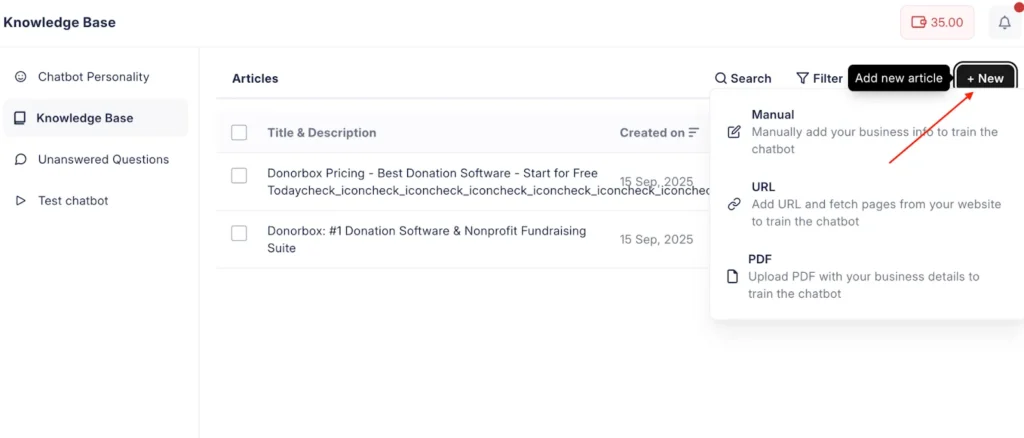
With JoyzAI, you can update your knowledge base in the following ways:
- Website URL: Just type in your website’s URL, and the AI will fetch all the business data from your website.
- PDF: Upload content in the form of PDFs to update business info.
- Manual upload: You can manually type in or copy the relevant data about your business and go live with your chatbot.
All the articles (irrespective of upload type) can be edited or updated from the dashboard.
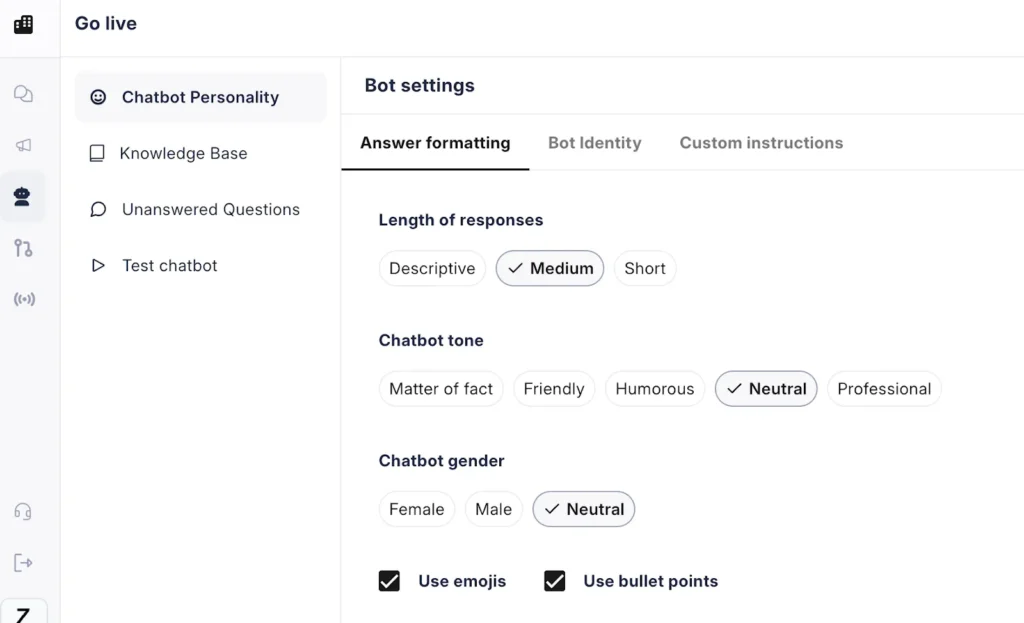
4. Define Your Chatbot’s Personality and Tone
Bots aren’t just robots. They’re your new “frontline agent.” Do you want your business to feel warm? Fast and efficient? Playful? Reserved?
With JoyzAI, you set:
- Tone: Professional, casual, friendly
- Response length: Short for quick answers, long for detailed instructions
- Emojis or no emojis: For businesses that want to feel more approachable (think cafes or gyms)
- Name and identity: Brand your bot with a custom name so customers remember the interaction
- Fallback replies: Decide what the bot says if it doesn’t have an answer for any query (“I’ll get back to you soon!”)
This is important because people talk differently to banks than to burger joints. When you match your AI bot’s tone to your brand, customers instantly feel “this is for me,” not some generic, frustrating script.
Step 5: Add Workflows

AI chatbots can go beyond answering questions and do simple tasks on autopilot:
- Booking appointments (“Can I book a haircut for Friday?”)
- Handling orders (“Order a chocolate cake to 5th Avenue by 3 PM”)
- Canceling subscriptions (“Cancel my gym membership”)
- Collecting details (“What’s your email so we can send a tracking link?”)
With JoyzAI Workflows:
- Set triggers (“cancel subscription”) that launch the workflow.
- Specify each action and what info to collect.
- Add conditions, fallback options, or escalation to a human if needed.
This means your bot doesn’t just chat but works for you, reducing repetitive admin and letting your real team focus on high-value jobs.
Step 6: Test Your AI Chatbot

Before going live, test if the chatbot is responding to customer queries the way you wanted it to. Ask your team to “test ” the bot by pretending to be customers. The more you train it before the launch, the better it becomes.
Step 7: Set Up Your Channels
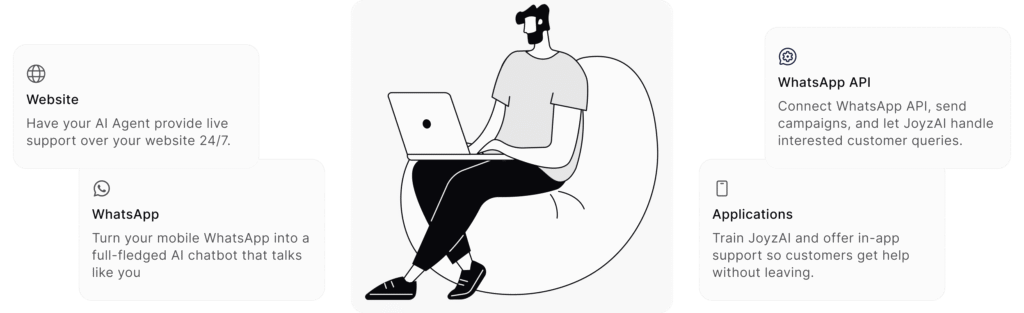
With JoyzAI, you can seamlessly integrate and automate chatbots across multiple platforms, including:
Your website:
- Add a chat icon (“Chat with us!”) in any size and color to match your brand.
- Pre-load a greeting and key FAQs for instant value.
- Copy-paste the integration code on your website, and you’re done.
Native WhatsApp:
- Link your regular or business WhatsApp number.
- Choose reply settings (group chats, 1:1, or both).
- Block or exclude specific contacts like your friends, family members, etc.
Step 8: Monitor & Iterate for Better Results
Watch your dashboard for incoming chats, flagged questions, and quick analytics (number of conversations, response times, FAQ hits, and more).
Don’t panic at unanswered questions. They’re your to-do list for making the bot smarter. Keep updating your knowledge base so your chatbot is updated with the latest information.
Step 9: Leverage Insights
Every conversation with your AI chatbot is a goldmine of customer insight:
- FAQs: Which questions come up over and over? Consider adding these answers to your website or marketing.
- Unmet needs: Are people asking about products or services you don’t offer yet?
- Journey gaps: Are customers dropping off at a certain step (e.g., payment, scheduling)?
- New lead details: Integrate bot data with your CRM so repeat customers never have to re-enter info.
Platforms like JoyzAI track all this effortlessly, presenting it in easy dashboards so you can make data-driven decisions without becoming a data scientist.
Step 10: Scaling Up and Fine-Tuning
Your first AI chatbot should solve your biggest pain point. Once it’s live, you can expand the tools to other areas, like:
- Automating follow-up messages to nurture leads.
- Running WhatsApp campaigns for deals and events.
- Connecting to eCommerce and booking platforms.
- Supporting onboarding, surveys, order tracking, and feedback collection.
In simpler words, keep listening to customer feedback, updating your flows, and expanding your automation. Now and then, review your “unanswered questions” to add knowledge and fix any mistakes.
Best Practices For Making AI Chatbot
You can’t simply set up your chatbot once and call it a day. Consider the following things to ensure that it keeps working well for your customers:
1. Start with common FAQs, then expand
Don’t try to make your chatbot a “know-it-all” on day one. Begin with the questions customers ask most often, like pricing, timings, or delivery, and slowly add more over time.
2. Update your unanswered questions section
Even the best AI chatbot won’t get everything right on day one. That’s why JoyzAI gives you an “Unanswered Questions” section.
Check this regularly to see what queries your bot missed. If they’re important, add them to your knowledge base so the bot learns. Over time, this simple habit makes your chatbot smarter and ensures customers always get accurate answers.
3. Always set a fallback response
No chatbot will know everything. Set a polite fallback reply like: “I don’t have the answer right now, but our team will get back to you soon.”
4. Match tone to your brand voice
If you run a law firm, keep the chatbot professional. If you run a cafe, keep it casual and fun, and maybe even add emojis.
5. Regularly update the knowledge base
There are always some changes that you’re going to make in your business, like new offers, new services, and new FAQs. Update your bot’s knowledge base regularly so it never feels outdated.
Real-World Use Cases: How Chatbots Change Everyday Business
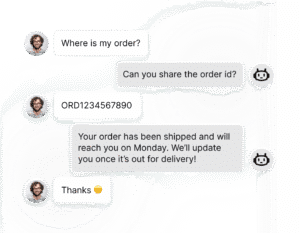
- E-commerce: Auto-replies to product queries, tracks orders, captures leads, and increases conversion rates, especially after hours.
- Real estate: Qualifies prospects, books property viewings, and directs leads directly into CRM pipelines for agent follow-up.
- Clinic/Healthcare: Registers new patients, delivers updates, and manages insurance questions, all automatically.
- Travel: Provide live booking, hotel, and trip details, including confirmation and amenities.
Conclusion
If you’re still feeling stuck after weeks or even months of research and tutorials, don’t be discouraged. Building an AI chatbot is not just for big brands or technical founders.
Every day, small businesses can, and do, launch successful bots thanks to platforms like JoyzAI. Doing it yourself is possible, but know your limits: coding takes skill and time, hiring takes money, and platforms offer speed, simplicity, and reliability for 90% of businesses.
Take the first step today with JoyzAI.
FAQs on How to Make AI Chatbot
Q1: What if my chatbot misses questions or makes mistakes?
Every query missed by the bot goes under the “unanswered section”. From there, you can add answers to those queries in your knowledge base. Here, you can add the answers to those questions and increase the efficiency of the chatbot. Once added, the chatbot will take up all similar queries in the future.
Q2: How long does it take to launch?
Basic FAQ bots can go live in 1–3 hours. Custom flows and multi-channel deployment may take a few days to refine.
Q3. How does an AI chatbot generate responses to customer queries?
Based on the information provided by you in the knowledge base and past user interactions, the AI chatbot generates relevant and human-like responses.
Q4. What affects a chatbot’s ability to answer questions?
A chatbot’s ability to answer questions depends on the knowledge base you give it. The more FAQs, docs, or details you add, the better the chatbot understands your target audience and gives better answers.
Q5. How do I create my first chatbot using JoyzAI?
Getting started with JoyzAI is very simple. All you need is to sign up with your email, train the chatbot by adding the information related to your business, and go live on the website, WhatsApp, or custom apps.